
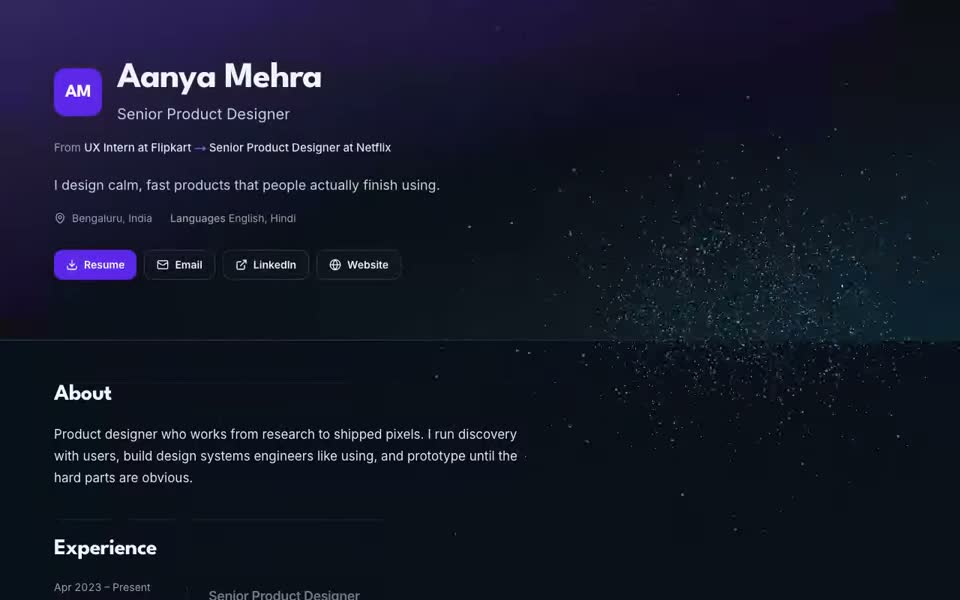
Built from your profile
Name and title, about, experience, projects, skills, education, certifications, languages, links and a resume download, taken from the profile you already filled in. No page builder.
Free for life
Claim My Job turns the profile you already filled in into a live page at claimmyjob.com/p/your-name. Pick one of six looks, publish in one tap, and share one link with recruiters. Free on every plan, no card needed.
Name and title, about, experience, projects, skills, education, certifications, languages, links and a resume download, taken from the profile you already filled in. No page builder.
On the Aurora look, one particle field follows the reader down the page: your name, your career as a 3D line with a node per role, each company while you read about it, and a constellation with a star per skill.
Switch any time and see your own page in the preview before you save. Every look and colour works in light and dark mode, or you can fix the page to one.
Crop it in the browser (location data is stripped before upload), show it in the header, or let the 3D story open on a particle portrait of it. Photos are stored privately.
claimmyjob.com/p/your-name, plus a QR code you can download as a PNG for your resume or business card. Pasted into LinkedIn or WhatsApp, the link shows your name and title.
Publishing adds the link to your profile, so the Claim My Job extension can fill Portfolio and Website fields on job applications. A three-step guide puts it on your LinkedIn profile.
Each look comes in 6 colours (Violet, Ocean, Emerald, Amber, Rose, Graphite), in light and dark.
Create an account and add your resume or basic details. Finishing setup saves a private draft of your portfolio.
Choose a look, a colour and light or dark on Portfolio in your dashboard, and add a photo if you want one.
Press Publish, copy your link or download the QR code, and add it to LinkedIn.
Yes. The portfolio is free on every Claim My Job plan, including the free plan, with no card and no trial. You only need an account. Paid plans are for auto-apply volume and AI features, not for the portfolio.
Your page lives at claimmyjob.com/p/your-name. The link starts on your name if nobody has taken it, otherwise a short tail is added. You can edit it before you publish; changing a saved link stops the old one working.
The Aurora look draws your name, career path and skills as a field of particles that moves in depth as you scroll; Terminal, Editorial and Studio have their own versions (LED-style pixels, ink dots, bold flat dots). It runs in one lightweight WebGL canvas. Weaker phones get a lighter version, browsers without WebGL get a still design, and visitors who prefer reduced motion see the shapes change without animation.
Not unless you switch them on: both are off by default. Salary, notice period and demographic fields are never shown, and every section has its own switch.
Only if you allow it. A switch on the portfolio page decides whether search engines may list it. Drafts are never shown to anyone but you.
No. The portfolio is made and published from the dashboard on any device. The extension is only needed for auto-apply, where it can also put your portfolio link on applications.
Yes. Pages are built for phones as well as desktops, and weaker phones get a lighter version of the 3D effect so the page stays smooth.
The portfolio is one part of Claim My Job, an AI career copilot that also auto-applies on 20+ job boards, checks your resume with a free ATS checker and builds tailored resumes. See plans.