
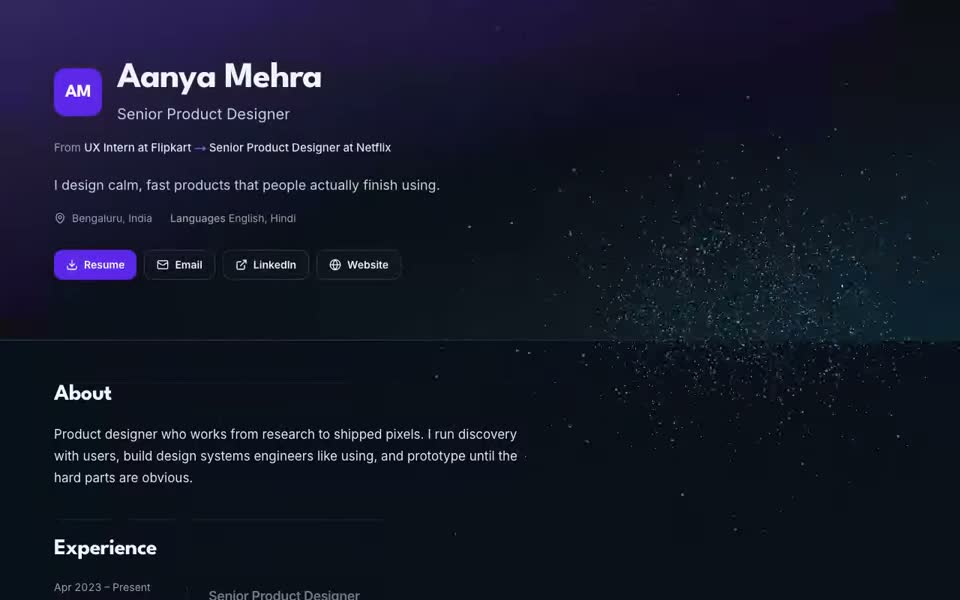
Short answer: Claim My Job gives every account a free portfolio website at claimmyjob.com/p/your-name, built from the profile you already filled in. Pick one of six looks, including Aurora, a 3D particle design, publish in one tap, and share a single link with recruiters. It is free on every plan, including the free plan, with no card, and it stays private until you publish it.
What is the Claim My Job portfolio?
A portfolio is a page that shows your career the way a resume can't: your story, your projects and your skills on one link that opens on any phone. Most job seekers never build one because website builders take a weekend and cost money every month.
Claim My Job skips both problems. When you finish setting up your profile, a private draft of your portfolio is already waiting. You choose how it looks and press Publish. There is no page builder, no hosting to pay for and nothing to keep in sync, because the page reads your profile every time it opens.
What goes on the page
Everything comes from your Claim My Job profile, so updating your profile updates your portfolio:
- Your name, title and an optional headline
- An About section (your profile summary if you leave it empty)
- Experience as a timeline, from your first role to your current one
- Projects, skills, education, certifications and languages
- Links (LinkedIn, GitHub and others) and a resume download
Each section has its own switch, so you can hide anything you don't want to show.
Six looks for different careers
Every look comes in six colours (Violet, Ocean, Emerald, Amber, Rose and Graphite) and works in light and dark mode. You can also fix the page to always light or always dark. The theme picker shows your own page as a live preview before you save.
| Look | What it feels like | Good for |
|---|---|---|
| Aurora | 3D particles that draw your name, career path and skills | Any career |
| Editorial | Calm serif type and quiet motion | Finance, law, consulting, HR |
| Terminal | Monospace, a command prompt, your name typed in | Engineering, data |
| Studio | A solid block of colour with heavy type | Design, marketing, creators |
| Quest | Your career as a game level, with a player card | Anyone who wants to stand out |
| Badge | Your photo on an ID card that swings on a lanyard | Creatives |
How the 3D works, and why it stays fast
On the Aurora look, one field of particles follows the visitor down the page and rebuilds itself for each part of your profile: your initials or name in the hero, your career as a 3D line with a glowing node per role, each company's name while that role is on screen, and a constellation with one star per skill. Terminal, Editorial and Studio have their own versions: LED-style pixels, fine ink dots and bold flat dots.
It is built to load quickly on ordinary phones:
- It runs in a single lightweight WebGL canvas, loaded after the page itself.
- Weaker phones and data-saver mode get a lighter version that only redraws while scrolling.
- Browsers without WebGL get a still design, and visitors who prefer reduced motion see the shapes change without animation.
- The page text is plain HTML, so recruiters and search engines can read it without waiting for any animation.
If you add a photo, the story can open on a particle portrait of it, where every dot takes its colour from your photo.
You decide what is public
- Private until you publish. A draft opens only for you, with a banner saying so.
- Email and phone are off by default. Turn them on only if you want recruiters to contact you directly from the page.
- Some things never appear: salary, notice period and demographic details are never shown.
- Search engines are your choice. A switch decides whether search engines may list your page.
- Photos are private files. Your photo is cropped in your browser, location data is stripped before upload, and it is stored privately and shown only while the page is published.
- Unpublish any time. The page stops being shown, for every visitor within about a minute.
How to publish yours in three steps
- Sign up free at claimmyjob.com and add your resume or basic details. Finishing setup saves a private draft of your portfolio.
- Pick a look on the Portfolio page of your dashboard: a look, a colour, light or dark, and an optional photo.
- Press Publish, then copy your link or download the QR code.
Your link starts on your name, such as claimmyjob.com/p/aanya-mehra, if nobody has taken it. Otherwise a short tail is added.
How to use it in your job search
- On LinkedIn: the dashboard walks you through adding the link to your LinkedIn contact info in three steps.
- On your resume: download the QR code as a PNG and add it to a printed resume or business card.
- On applications: publishing adds the link to your profile, so the Claim My Job Chrome extension can fill Portfolio and Website fields when it applies for you.
- In outreach: AI email drafts to hiring managers end with your portfolio link when you have one.
- In chats: pasted into LinkedIn or WhatsApp, the link shows a preview card with your name and title.
Frequently asked questions
Is the portfolio really free?
Yes. It is free on every Claim My Job plan, including the free plan, with no card and no trial that runs out. Paid plans are for auto-apply volume and AI features, not for the portfolio.
Do I need the Chrome extension?
No. You make and publish the portfolio from the dashboard on any device. The extension is only needed for auto-apply.
Can I use my own domain?
Not today. Your page lives at claimmyjob.com/p/your-name, which you can keep short and use anywhere.
Will Google find my portfolio?
Only if you allow it. The search-engine switch on the Portfolio page decides whether your page can be listed.
Make yours now
Your profile already holds everything the page needs. Create your free portfolio, or read more on the free portfolio website page. While you are there, try the free ATS checker and see how Claim My Job auto-applies on 20+ job boards.